Segments
Segments is where you manage reusable client groups for campaigns. Mimbbo includes automatic segments that update from current customer patterns, and you can create custom segments for static lists your team controls.
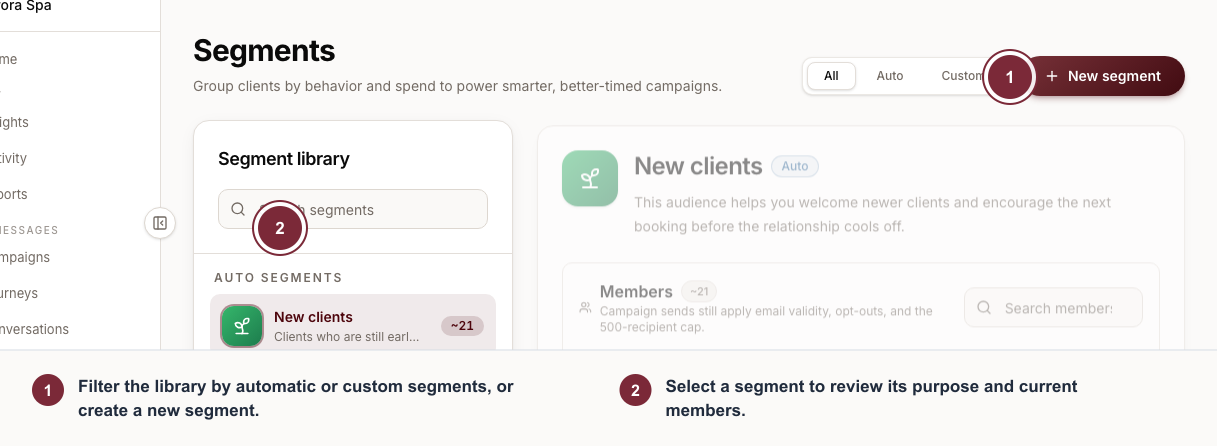
Use Segments to choose a Mimbbo-maintained group or create a list your team controls.
- Filter the library by automatic or custom segments, or create a new segment.
- Select a segment to review its purpose and current members.
Use Segments when you need to
- Find Mimbbo-managed groups such as new clients, regulars, lapsed clients, high-value clients, steady clients, and deal lovers.
- Understand what an automatic segment is meant for before choosing it in a campaign.
- Create a custom list for a promotion, event, service launch, or follow-up group.
- Add existing clients to a custom list.
- Create a new client record and add it to a custom list.
- Archive a custom list when it should no longer be used.
Work with automatic segments
Automatic segments are maintained by Mimbbo. They can be viewed and selected for campaigns, but they cannot be renamed, edited, deleted, or manually changed.
Automatic segments include:
- New clients: clients who are still early in their relationship with your business.
- Regulars: clients with an established repeat relationship.
- Lapsed: clients who have fallen out of their usual booking rhythm.
- High-value: repeat clients who are especially important to retain.
- Steady: reliable repeat clients who may respond well to useful reminders and add-ons.
- Deal lovers: repeat clients who are more likely to respond to value-aware messages.
A client can appear in more than one automatic segment. For example, a client can be a Regular and also belong to High-value, Steady, or Deal lovers. Mimbbo resolves campaign recipients at send time and includes overlapping clients only once.
Create and manage custom segments
Custom segments are static lists created by your team. Use them when you already know the exact group you want to contact.
- Open Segments.
- Create a custom segment with a clear name and description.
- Add clients from your existing client records.
- If the client does not exist yet, create the client record and add it to the list.
- Rename or update the description when the list purpose changes.
- Archive the list when it should no longer be available for new campaigns.
Custom segment membership does not update automatically. Review the list before important sends so the segment still matches the campaign plan.
Use segments in campaigns
Campaigns can use all clients with email, one-off selected clients, or saved segments. Saved segments can include one or more automatic or custom lists.
When a campaign uses saved segments:
- Mimbbo resolves the final recipients when the campaign starts, not when the campaign is drafted.
- Clients who appear in more than one selected segment are included once.
- Missing emails, invalid emails, and campaign opt-outs are skipped.
- The campaign still follows the 500-recipient limit.
Use automatic segments for current Mimbbo-maintained groups. Use custom segments when your team wants to preserve a specific list of clients.