Review campaign results
Campaign results help you understand what happened after an email campaign started sending.
Review a campaign
- Open Campaigns.
- Select the campaign you want to inspect.
- Review delivered, opened, clicked, and failure-related counts.
- Use the campaign list to compare recent sends at a glance.
- Review the recipient table when you need deeper detail.
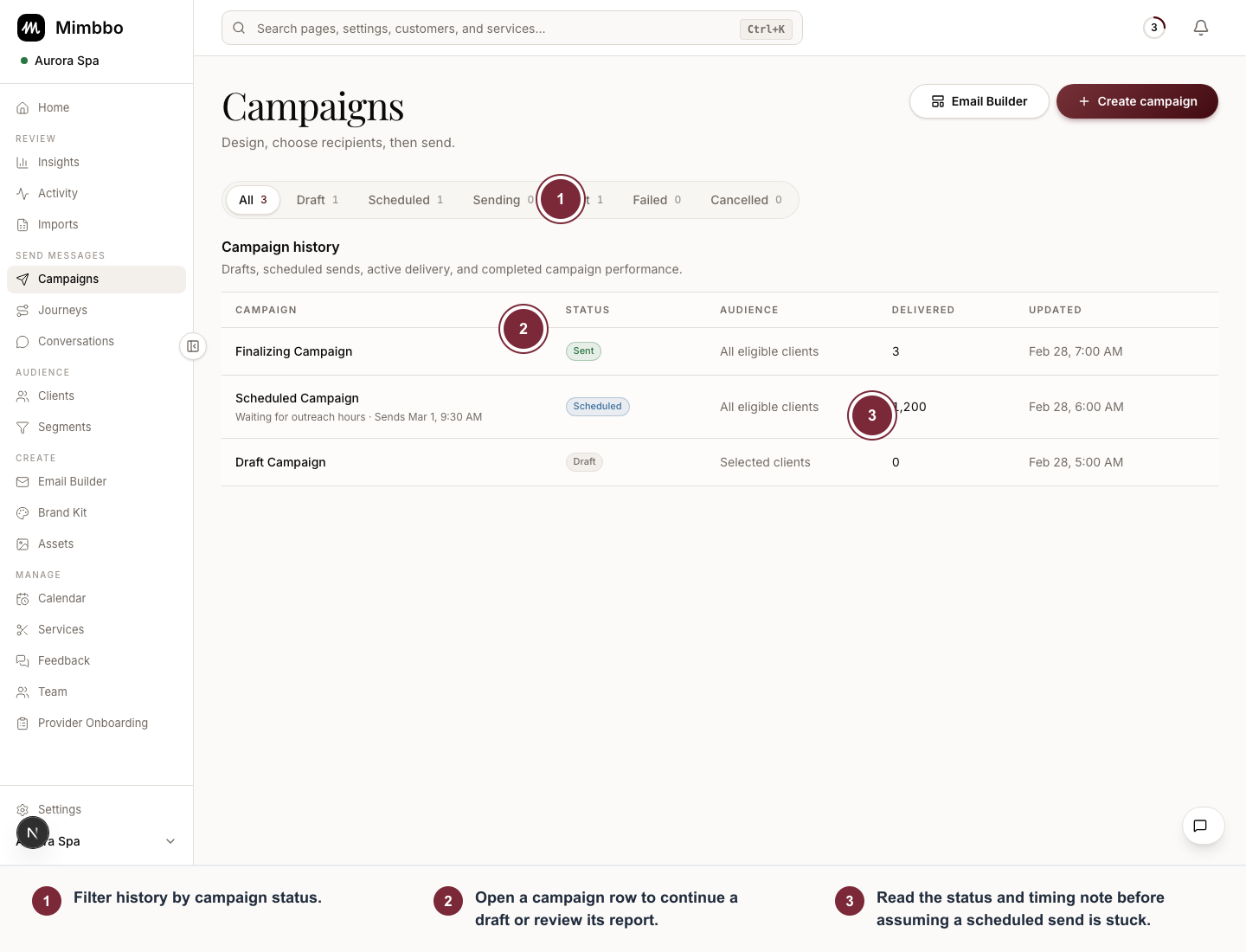
Campaign history separates work in progress from completed sends and shows when outreach is waiting for permitted hours.
- Filter history by campaign status.
- Open a campaign row to continue a draft or review its report.
- Read the status and timing note before assuming a scheduled send is stuck.
Understand FINALIZING
- A campaign can reach completed state before every recipient record fully settles.
- When that happens, Mimbbo shows FINALIZING and keeps refreshing the data.
- Wait for finalizing to clear before you treat the totals as final.
Work from the recipient table
- Filter recipients by status when you need to focus on a specific outcome.
- Review recipient-level delivery and engagement metrics.
- Open the related conversation when a recipient reply needs attention.
Move from campaign data to follow-up
- Watch failures, bounces, and complaints alongside opens and clicks.
- Open Conversations from the campaign when you need to handle replies.
- Use what you learn to adjust the next recipient group, message, or send time.
Last updated on