Finish your setup
The numbered circle beside Notifications shows how many required setup items remain. Select it to open Get ready.
Each row opens the part of Mimbbo where you can finish that item. The circle disappears when every visible required item is complete.
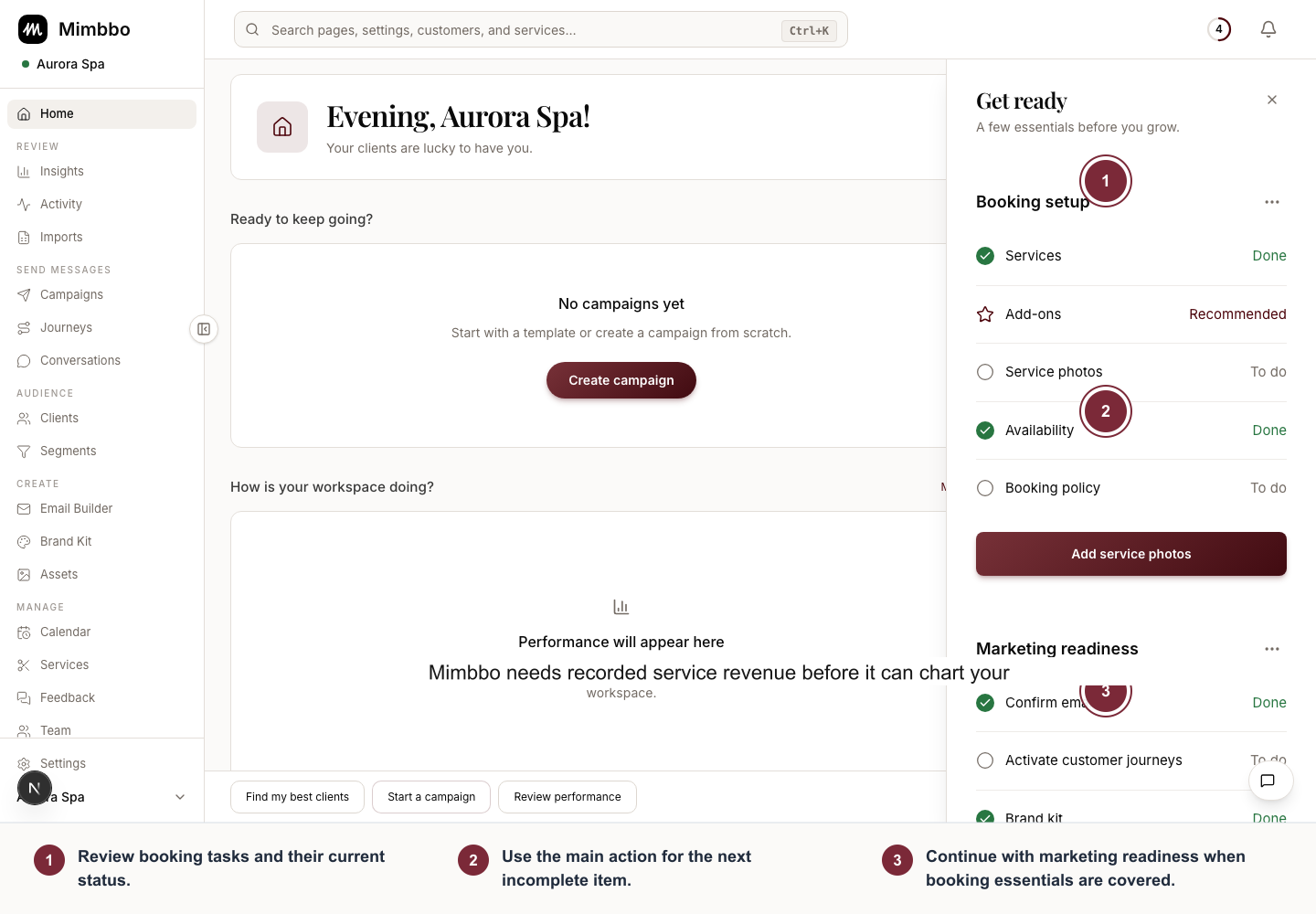
Get ready keeps launch-critical work visible while separating completed, recommended, and remaining tasks.
- Review booking tasks and their current status.
- Use the main action for the next incomplete item.
- Continue with marketing readiness when booking essentials are covered.
Booking setup
Booking setup appears only when your business uses Mimbbo’s booking link. Mimbbo checks the same account data for new and existing businesses.
- Services is done when you have at least one bookable service.
- Add-ons is recommended. It does not increase the number in the circle.
- Service photos is done when every bookable service has at least one image.
- Availability is done when at least one active team member has weekly availability.
- Booking policy is done after someone with modify or admin access reviews and confirms Calendar settings.
Use Set up services, Create add-ons, Set weekly availability, and Set booking rules for detailed steps.
Marketing readiness
- Confirm email is done when the Mimbbo business email is ready and email messaging is on.
- Activate customer journeys is done when at least one journey is active.
- Brand kit is done when the business has a logo and primary brand color.
- Send your first campaign is done after a campaign reaches Sent or Completed.
Use Messaging settings, Customer journeys, Business profile, and Campaigns to complete these items.
Remind yourself later
Open the three-dot menu beside Booking setup or Marketing readiness to:
- Hide that section until tomorrow.
- Hide that section for one week.
- Dismiss that section for your own teammate account.
Snoozing or dismissing a section does not mark its items complete and does not change setup for other teammates.
Why a completed item can return
Get ready checks current account data. An item can return if a required service is removed, a service photo is deleted, email is turned off, all journeys are paused, or another required setting no longer qualifies.