Billing
Open Settings → Billing to see your subscription and the next step for your business. A business admin can manage the subscription and view invoices.
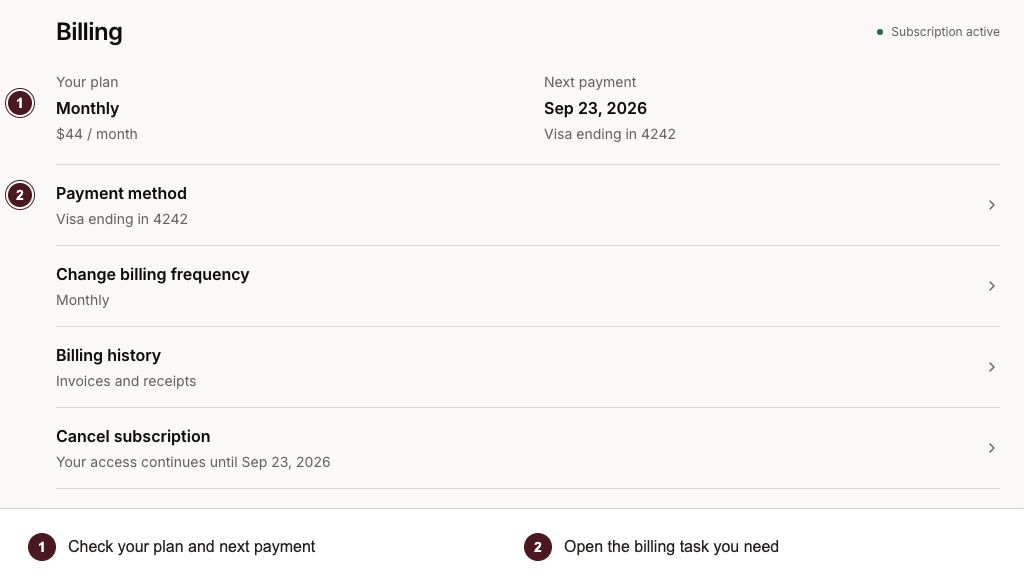
Check your next payment, then open the billing task you need.
- Review your current plan and the next payment or access date.
- Open the task you need; only that task’s controls are shown.
Get started without a card
Your Mimbbo trial starts when your business is created. You can set up the business, import clients, and work without adding a card. Billing shows the exact end date. Mimbbo sets the default length and may set a different length for your business.
After the trial, a paid subscription or free-access grant keeps full access. Otherwise, you have limited access: you can view saved work but cannot make changes. An account-status modal explains how to restore full access. Choose Continue browsing to view your business. The You have limited access banner stays visible. The modal appears again when you return to the portal.
Subscribe to Mimbbo
- Open Billing, or choose Restore access in the banner.
- In Billing, select Choose a plan, then choose Monthly or Annual.
- Select Review plan to check the amount due today, price, and billing frequency.
- Select Subscribe to Mimbbo and add your card in secure checkout.
From the access banner, the recovery dialog lets you choose a plan and continue directly to checkout.
Checkout shows the amount due today. Your paid subscription begins immediately and is billed in advance for the coming month or year. The Mimbbo trial does not restart when you subscribe or resubscribe.
Access returns after the subscription is confirmed. Leaving checkout before it finishes does not start a subscription.
If your business already has a Stripe trial
Some existing businesses started a card-backed Stripe trial before Mimbbo introduced the single no-card trial. Billing keeps the promised end date and shows when the first payment is due. You can manage your payment method, review available billing frequencies, or cancel that trial.
A scheduled cancellation keeps trial access through the displayed end date. You can choose Keep my subscription and confirm if you change your mind before it ends.
Manage payments and receipts
Your subscription renews monthly or annually according to your plan. Billing shows the next payment date and any scheduled plan change. Open one billing task at a time; choosing another closes the previous section.
- Open Payment method, then choose Manage payment method to update your card.
- Open Billing history to review past charges and receipts.
- Open Change billing frequency, select a plan, then choose Review plan change. Check the price before you confirm. Use Back to change your choice. Custom pricing and active offers may limit changes.
- Open Cancel subscription (or Cancel trial), then choose Continue to cancellation. Review the access end date and confirm to stop future renewals.
Canceling a subscription does not delete your business. Business deletion is in Settings → Business Profile and may require subscription cancellation first.
Restore access
If a payment fails or subscription access ends, you have limited access. Open Billing and follow the payment action shown. A business admin must complete subscription changes; other team members can view account status and ask their admin for help.
Mimbbo may grant free access for a limited period or indefinitely. Billing shows that access and its end date when applicable.
Resolve an account restriction
An admin block is separate from billing. The account-status message uses the heading, explanation, and action set by Mimbbo. This modal cannot be dismissed. Follow its instructions to resolve the block, or switch to another business you can access.
An active subscription or free-access grant does not remove an admin block. Mimbbo must remove the block after the issue is resolved. Blocking access does not cancel the subscription or stop billing.