Messaging
Messaging settings control customer email and when automated outreach can send.
Set outreach hours
Every provider starts with outreach hours of 9:00 AM–7:00 PM every day in the business timezone.
- Open Settings.
- Choose Messaging.
- Open Outreach hours.
- Confirm the business timezone.
- Set the start and end time, then save.
Campaign and Journey emails wait until the next opening when their scheduled send time or next-step time falls outside this window. Mimbbo shows Waiting for outreach hours and the next send time while they wait. Before release, Mimbbo checks the current timezone, hours, outreach status, and customer preferences again.
Direct replies, forwarded copies, test emails, and account or security messages do not use outreach hours.
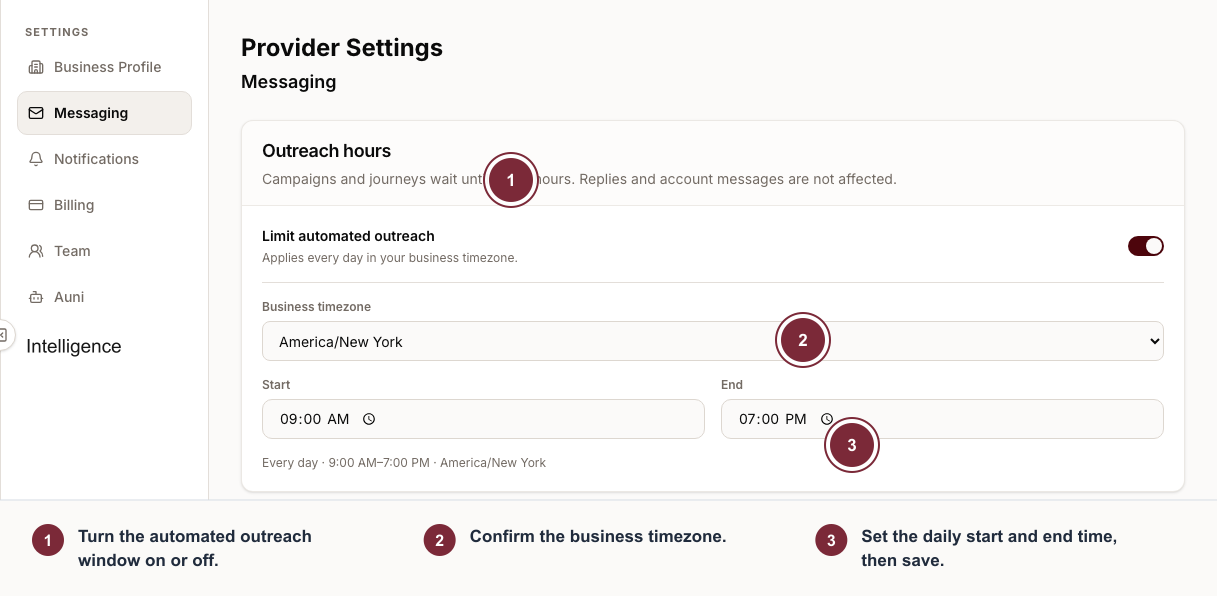
Open the sender or outreach-hours section for the task you need.
- Open Email sender to manage connected addresses, forwarding, and sender rules.
- Open Outreach hours to set the business timezone and daily sending window.
Choose or review the Mimbbo mailbox
- Open Settings.
- Choose Messaging.
- Open Email sender and enter a mailbox name when one is not already selected.
- Check availability.
- Enable conversations when the address is ready.
The mailbox preview shows the full Mimbbo-managed address clients can see. Production mailboxes use the provider mail domain, such as pro.mimbbo.com; non-production environments use the matching environment domain.
Use an existing email address
Use linked email when the workspace should send templates, campaigns, and replies from an address outside Mimbbo’s mail domain.
- Open Email sender, then choose Connect existing email.
- Select Google or Microsoft 365.
- In your default browser, choose the email address you entered and approve sending and reply access.
- Return to Mimbbo. Mimbbo finishes setup and makes the address available as a sender.
For another provider, select IMAP/SMTP and follow the credential setup shown in Mimbbo. This flow does not open Google or Microsoft authorization.
Only a business admin can connect, change, or remove a linked email. One Google or Microsoft mailbox can be connected to one Mimbbo business at a time.
Review the status before sending:
- Connected means Mimbbo can send and sync replies.
- Connected for sending means outbound email is available, but replies are not syncing yet.
- Reconnect means Mimbbo needs fresh provider access before it can keep using the address.
Mimbbo stores a copy of messages it sends and receives through the linked account. Auni and Conversations read that Mimbbo copy, not the live provider mailbox, when drafting or responding.
If a linked account disconnects or its access expires, reconnect it before sending or syncing new email through that address. Choose the same address when the provider asks which account to use.
Removing a linked account stops Mimbbo from using that sender and removes Mimbbo’s stored connection credential. Google access is revoked during removal. Microsoft does not provide an app-only token revocation action, so remove Mimbbo from Microsoft My Apps when Mimbbo prompts you to finish revoking Microsoft access. Existing conversation history remains in Mimbbo.
Manage email forwarding
Open Email sender, then Email forwarding, to send copies of customer emails to other addresses.
- Separate multiple forwarding addresses with commas.
- Save forwarding after changing the destination list.
- Turn forwarding off when Mimbbo should stop sending copies.
Forwarding does not replace the Conversations inbox. It sends copies while Mimbbo still keeps the conversation record.
Understand linked-email reporting
Mimbbo can report conversation activity and provider-accepted sends for linked accounts. It may not have delivery, bounce, complaint, open, click, or SES inbound verdicts for those messages. Use campaign results from linked accounts as activity reporting unless Mimbbo shows provider-specific evidence for a stronger status.
Manage blocked and spam senders
Open Email sender, then Blocked and spam senders. Sender rules apply to exact email addresses.
- Spam rules move matching conversations out of the normal inbox.
- Block rules stop future inbound email and new bookings from that exact address.
- Removing a sender rule lets future messages from that address behave normally again.
Use sender rules for unwanted or unsafe senders. Do not use them to manage ordinary client preferences; use email preference links when the client is opting out of outreach.