Auni Assistant
Auni Assistant helps with customer-facing work according to the topics, tools, and guardrails you choose.
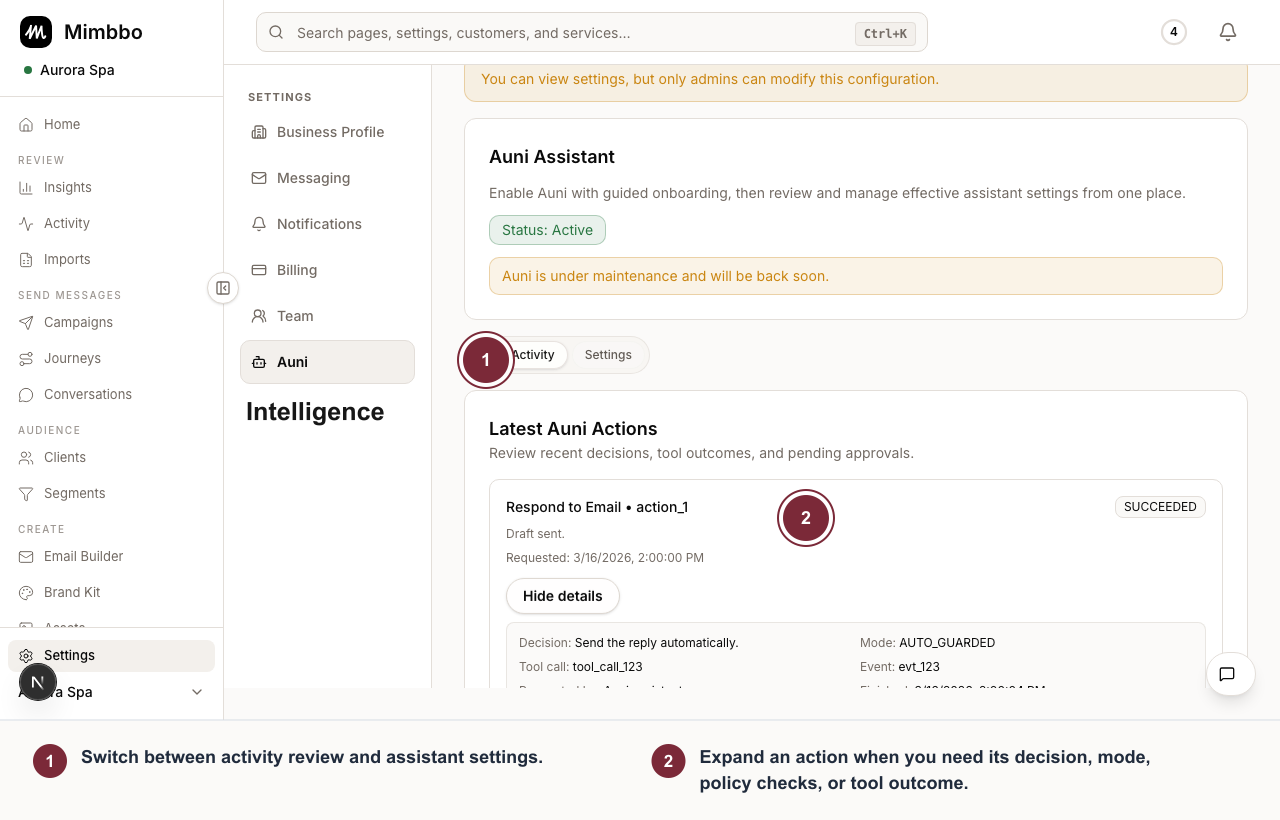
Auni Activity explains what the assistant attempted, which mode applied, and what happened.
- Switch between activity review and assistant settings.
- Expand an action when you need its decision, mode, policy checks, or tool outcome.
Enable Auni
- Open Auni Assistant.
- Review the current assistant state.
- Enable Auni if it is not active.
- Complete onboarding if Mimbbo asks for required context.
If Auni is disabled by an admin override, the page may be read-only until the override is removed.
Configure effective settings
Use effective settings to control assistant memory and provider-specific rules. Memory retention controls how long Auni can retain relevant assistant memory, within the allowed range Mimbbo provides.
Save changes before leaving the page. Unsaved settings do not change assistant behavior.
Choose allowed topics
Allowed topics decide what Auni may discuss:
- Services for services, duration, and service availability.
- Business operations for hours, booking links, and team members.
- Appointment for appointment details, booked services, and appointment facts.
When a topic is disabled, Auni declines requests in that area even if a related tool is available.
Choose tool modes
Tool modes control how Auni uses each available action.
- Off prevents Auni from using that tool.
- Suggest only prepares a suggestion for review.
- Auto guarded lets Auni act within the tool’s guardrails.
Some tools can be read-only because of an admin override. Those rows stay visible so you can understand why Auni is constrained.
Review Auni activity
Use Auni Activity to review recent decisions, tool outcomes, pending approvals, and detailed rationale.
For actions awaiting approval, review the decision, policy checks, risk signals, and tool outcome before approving or rejecting. The activity log helps explain what Auni tried to do and why.
Delete Auni carefully
Deleting the assistant removes active assistant operation for the provider. Use it only when the provider no longer wants Auni available.
For settings-side controls, read Auni Assistant settings.